

The web pages for all BBC music radio shows include tracklistings for each episode. Each song has a link to the corresponding Artist Page on the BBC Music website (above). And, crucially, the information on all those Artist Pages is taken from MusicBrainz – the world’s largest public domain music database.
The important news for independent artists is that if you don’t already have an artist profile on MusicBrainz, next time you’re played on BBC radio the tracklisting will either point at an empty Artist Page or – worse still – may not point at anything at all.
The good news is that MusicBrainz (a collaborative public domain project like Wikipedia) allows you to create and maintain your own artist profile on its database.
At first sight, the MusicBrainz website looks a bit daunting, but don’t panic! We’ve broken the whole resgistration process down for you into 10 easy-to-follow steps.
1. Go to http://musicbrainz.org
2. One the front page click ‘Create Account‘

3. Enter a username, password, and email address when prompted, and click ‘Register account’
4. You’ll get a confirmation message on screen. You’ll also receive an email asking you to verify your email address: when you click the link, this message will appear in your browser.

NOTE: Whenever you are logged in, your username will appear at the right hand end of the yellow menu bar at the top of the page:

5. Clicking your username brings up a screen something like this:

6. IMPORTANT: this is your profile as a registered MusicBrainz user. As a registered user you can now create your profile as a band or artist. To do this, hover your cursor over ‘Editing’ on the yellow menu bar, and choose ‘Add Artist’.
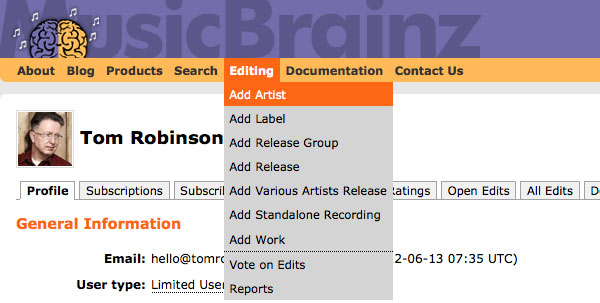
7. You can now enter information about yourself as an artist or band…

NOTE: the ‘Edit note’ section (above) is just for the information of other Musicbrainz users, and doesn’t appear on your public profile.
8. Click the ‘Enter edit’ button.
A summary of your new Artist information is now listed on the right hand side (see screenshot below), with a list of editing options you can explore later. The most important thing at this point is to add links to your own artist pages on YouTube, Bandcamp, Facebook, Twitter, Soundcloud etc.

9. To do this, click on Relate to URL which produces the page below. This has a drop-down menu labelled ‘Type“. For a Facebook bandpage choose “has a social networking page at”. For Twitter choose “has a microblog at”. For Bandcamp, choose “music can be purchased for download at”. YouTube and Soundcloud have their own menu options:

Fill in the URL field as required…

Again put an explanation for other Musicbrainz users in the Edit Note field, and click on the “Enter edit” button. The web links you have entered will now appear in your Artist Page on the BBC Music website. And as soon as your music’s played on BBC national Radio, the show’s tracklisting will link to that page. Good eh?
10. Once you HAVE created your Musicbrainz profile and been given airplay on a national BBC station, you can then supply BBC Music with a photo for your BBC Artist page. This should be a head shot or close-up photo of the artist – not artwork or logos etc – in landscape format at least 1920 pixels wide x 1080 pixels high, although larger images are welcome.
Email your photo to: musicfeedback@bbc.co.uk and confirm in writing that you 1) hold the rights to the picture you are sending, and 2) grant the BBC permission to to use it on their websites without an on-screen credit. But for technical reasons, do please wait until you have had national airplay first, before sending the photo.

Based on an invaluable guide originally written by Graham Albans in 2009 while working as an intern with BBC Introducing: Fresh On The Net at 6 Music. A former stalwart at Leeds Student Radio and producer at BBC Introducing In West Yorkshire, he graduated in 2011 and moved to London. His Twitter feed @GrahamAlbans describes him as “a Radio ninja at BBC Radio 2. I work on The Chris Evans Breakfast Show. Husband and a fan of porridge.” Also see: Graham’s excellent advice on How Not To Write A CV.





Great site – such useful information. Thanks!
Top stuff. Have followed this and it worked a treat. Just a note, it looks like the bbc Artist page spec has changed. When I sent a photo, I was asked if I could send one that was at least 1024×576 pixels.
It now looks rather lovely on their! Just trying to get my head around getting something about the band on Wikipedia so we can have our biog on there as well.
Thanks for that Matt – have updated the photo spec in the post accordingly. Glad it was helpful 🙂
Tx
As a band of based on Costa rica we could participate on this website? We already have some presence in soundcloud. https://soundcloud.com/music2think
Thanks Tom,
Makin’ music is the easy part… don’t think we could have navigated Musicbrainz without ya laddie!
Best Wishes, Stede & Monty Del Zorro
Thanks for the help Tom. This makes a complicated site seem much more user friendly!
hi tom,
i am a little unsure how to get my bio on this page: http://www.bbc.co.uk/music/artists/1c22d019-ba83-4106-a722-94bb952e62a1
it says to create a wiki entry, and update music brainz, which is fine, do i just use the relate to URL, and enter in a link that way?
also i would love an avatar on there 🙂 thanks!
J
Really helpful article, so happy i read this pre looking on MusicBrainz, def made it a little easier 🙂 Thanks
Tom,
Had I not read your article, I would still be lost in MusicBrainz land!
Did tear a bit of my hair out I must admit.
I’m happy now that people will know who we are if our track gets played. Last time we got a track broadcasted by yourselves, I had no idea about MusicBrainz, so hopefully we are in a better position this time around. Will be sharing this with the musicians I know to help them, thank you for all your help.
Best,
Laura Alexa
Gilded Thieves
When adding URLs it’s generally not needed to select the type first as it will be auto-detected for most major music sites.
You don’t need telling from me, but you’re a legend! I got steered towards this site about 8 hours ago and I haven’t stopped reading, and being grateful, since.
Cheers for the useful guide Tom, I have found the musicbrainz website to be very user un-friendly… Still not entirely sure if I’ve got our page right yet!
I tried to use musicbrainz without this guide last year and gave up…THANK YOU Tom for making sense of it all….phew!
Thanks for choosing my track and am looking forward to you playing “Generics” soon!
Hugs
G
-x-
Thanks Tom
I think I have managed the basics for ‘Posh Ape’ 🙂
Not quite sure how the ‘voting’ works etc as Posh Ape does not immediately show up I am assuming that a friendly individual checks out the links and verifies the entry
Is that right?
Dan xo B-)
@Dan Vox It’ll all come together the next time you are featured on BBC Music radio. The playout system will – hopefully – retrieve your info from Music Brainz and create your BBC Music profile. Also once you’ve been played and that profile has been auto-generated, then the BBC Music team will also accept your artist photo via musicfeedback@bbc.co.uk to add to it.
Hey Tom
As you have kindly informed us that you are about to play something by the artist I represent (Little Sparrow) I was wondering if it is ok for me to register her to MusicBrainz on her behalf?
I believe that with your really helpful guide I should be able to do this if permitted.
It would of course involve using my e-mail address and contact details which we already use as the reference point for her bookings and all general inquiries. Can I do this?
She has already been played on BBC by Janice Long and Chris Hawkins so if it is allowed I can then add her biog and photo too.
Many thanks
Shay
Of course go right ahead Shay. And then once she’s been played, also send her photo to the address mentioned in the main article.
Thanks for your help Tom – much appreciated.
This was helpful, cheers.
First ty for the advice and info. My question is how do i know when they played a song or if they have or not?. Do they just randomly pick from website or do i have submit work?
how this dude got a wikipedia page with only 36 fans on twitter and no facebook page? https://musicbrainz.org/artist/c870f4b2-52db-4506-b27e-a64370075ddd
That Wikipedia page is in Cebuano – one of the languages spoken in the Philippines – perhaps they’re an important artist there?
Hi Tom,
Great guide!! Thank you!!! Do you recommend that artist also fill out the releases and recording sections before they have been played? They are quite confusing as well!
Quick Update on the image for BBC Artist Page
Required image size is now gone up again to 1920 x 1080 pixels
😉
Thanks Emile – duly updated! TR x
Thanks for this! Great guide – every time I logged into musicbrainz I logged out straight away until now 🙂
Thanks so much Tom and team! We don’t know how we would have fathomed Music Brainz without this fab guide! Edits submitted! Cheers, Pete, Steve, Dave and Sheena xx
Very helpful Tom and team! Took a while to set up but hopefully The Glass Children page is somewhere to be found in Music Brainz!
David and Daniella
Thank you for the guidance on MusicBrainz, Tom. Worked a treat. And thank you for the play last night 🙂 6 Music is pretty much the only station I’ve listened to since it began and its bloody fantastic to be included on your show.
Can I add multiple “artists” to an account or do I need to create a new account… for a new band? Thanks. Jim
Strewth! This is a quality guide, just created an artist page on there with one release, will have to crack on with the rest. It’s not that the Music Brainz site is complex, it’s just comprehensive!
Hi, Thanks for writing this article. I think I have now set up my account and added my band’s EP release. However I’m still unsure what BBC introducing are referring to by Music Brainz ID (MBID). I’m struggling to find the ID number. When I look in my edits there are various edit numbers. Should I supply BBC Introducing with an edit number for the whole EP? I’m confused. Thanks
Not to worry I’ve worked it out!! For the benefit of other users in the same predicament you need to log out of MusicBrainz first! Then look yourself up as if you were some random person having a little peruse of the catalogue. You may need to click Direct Database search at the bottom of the search page. Once you have found yourself click on your name. Then click on the Details tab. In this tab the MBID is listed!! Good Luck!
Hi Tom,
Thanks for your FAQ how to do it properly on messy MusicBrainz page.
Now I am wondering if BBC Radio1 Playlist will automatically update and how long does it take to refresh? Do I need to wait with sending the picture to BBC email until I am able to click on my Artist name on BBC Radio 1 playlist?
Thanks
Best Regards
Tom
Hello Tom – no it won’t automatically update retrospectively (I don’t think)… it will just work for anything that gets broadcast in the future. And yes, if you’ve already been played on BBC Radio then you can send them your photo straight away. Remember it needs to be 1920 pixels wide x 1080 pixels and try to choose one where your face is (or faces are) centre of the image, as it may crop automatically within the BBC system…
T x
Having big problems with Music Brainz.
Have added myself as an artist but when trying to add a release the site can’t find my artist name and keeps saying ‘you must add an artist and a tracklist’ … I search for the artist name and it’s just not there. Struggling!
Hi Tom, My daughters new single was played on BBC introducing Lancashire a week yesterday and I have only just realised that she needed to be set up as an artist on MusicBrainz, her account was there but the artist was not registered. Would the system create an artist page on the BBC now from the previous airplay. Thanks Frances
Hello Tom,
Looks like the instructions above are a bit outdated. The BBC site isn’t aligned with MusicBrains anymore. E.g., clicking on the link to you’r own profile page at BBC above, shows a message that the BBC site is restructured.
Another question, is the submissions only for UK citizens? Is that a policy for submissions to all BBC channels that plays unsigned artists?
Thanks
Hi team 🙂
This is a good article that has helped me get further with the MusicBrainz site than I’d managed on my own.
However, seeing as the article is a good few years old (and the site looks a bit different) it would be great if someone could write an updated version with current screenshots
There must be plenty of new info to add as well as some that is no longer valid.
Take care,
Kate